Showing posts with label Holidays. Show all posts

Friday, January 11, 2019

Valentine Garden - a new DIY Valentine design

Valentine's Day is in February which smack dab in the coldest, snowiest part of winter here in New England. I decided to incorporate a little springtime cheer with my Valentine design this year to helps us weather through until April.
My Valentine card uses the garden theme to brighten the dreary winter days. This design is based on the same construction concept as Zig Zag Village although a whole lot quicker to assemble because it doesn't have the fiddly details. And yes, it does fold flat for storage or mailing. It fits into a regular 6 x 9" booklet envelope.
Available in svg, pdf, png, and dxf formats here:http://3dcuts.com/heart-valentine-projects/valentine-garden

Assembly tutorial is here: http://3dcuts.com/valentine-garden-tutorial

And here is a quick link to the tutorial:

Happy crafting everyone!

Marji
3dcuts.com


Tuesday, September 18, 2018

Haunted Zig Zag Village

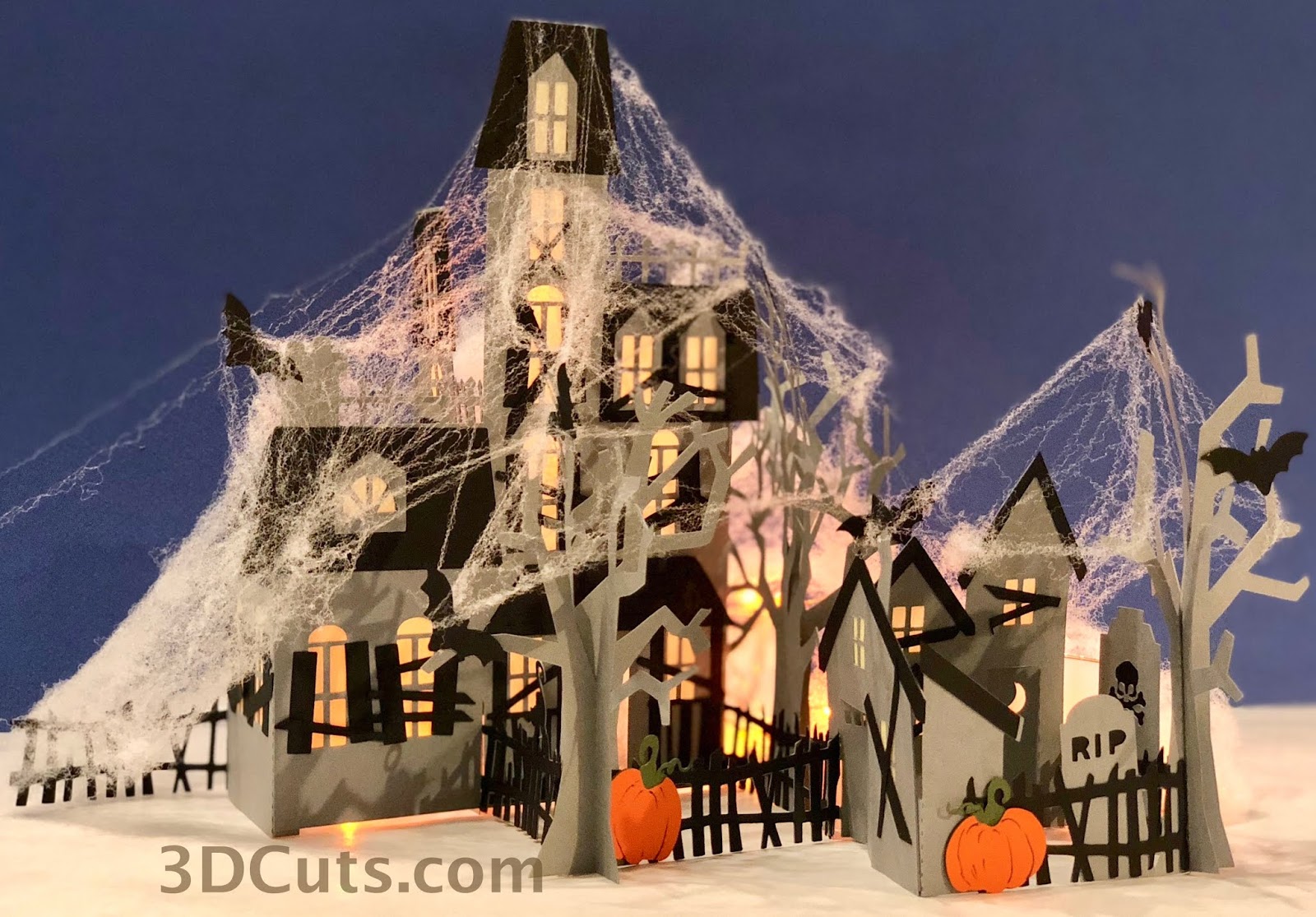
Yes, this is natural extension of my first and second versions of Zig Zag Village. Here is the Haunted Mansion version. It is complete with cats and bats, and pumpkins. Included is a haunted graveyard and outhouse. Pair the card stock mansion with some webbing and orange LED fairy lights and it becomes  spooky, fun Halloween decor.

Center


Pair the card stock mansion with some webbing and orange LED fairy lights and it becomes  spooky, fun Halloween decor.


The cutting file is available here:  http://3dcuts.com/zig-zag-village/hauntedThe detailed tutorial (including a video) is herehttp://3dcuts.com/zig-zag-village-haunted-tutorial 


Happy Halloween everyone!


Sunday, August 12, 2018

Zig Zag Village - It folds up!

Fellow crafters - It is never too early to start our Christmas crafting. Yesterday I released a new project that will get you started if you haven't already.

Check out my new Zig-Zag Village. I designed this because so many people have commented on how they love Tea Light Village but don't have storage space. I wanted to design a village that folds flat. And Zig Zag Village does just that! Of course this opens up the possibility of mailing it as a gift so I designed it to fit in a standard 6" x 9" booklet envelope.

The village is filled with charming details like window and door frames, porches and Christmas Wreaths. You can light it with standard LED tea lights or there are included bases for installing LED fairy lights.  Directions for all of it is included in the online tutorial which is complete with video assembly instructions. And below is a short video showing the ease of the folding.


Happy crafting everyone!


Saturday, November 18, 2017

Christmas Crafting Time is Here!

Christmas crafting comes a little early to my craft room because I have to get designs out for others to make in time for their holiday decorating.  I have just released the cutting files for 3 new tree ornaments. These are loosely inspired but Polish Folk art. There are 3 different ornaments all similar in design. They each use the curled paper as a 3D element but all can be stored flat!


I also completed the same files in a festive color scheme. Any coordinated pairs could be used so you can customize it to match your Christmas Tree color- scheme- if you have one.


I also spent some time re-doing some old files that were only available in the .studio format through the Silhouette Store. New on the 3Dcuts.com site this holiday season are a couple of my earlier card designs.

And a contemporary classic of mine is the HoHoHo trees for table decor. Again new to 3dcuts this year but previously available on the SIL store.


All of these are available on the Christmas Theme page at the 3dcuts.com website here.

Happy Holiday crafting everyone!
Marji
©2017 Ashbee Design, Marji Roy


Monday, October 23, 2017

Additions to Tea LIght Village

Although it is only October, those of us in the crafting world are moving onto Christmas. And every Christmas I add to Tea Light Village. I started this series in 2013 and it has just gotten better every year. This year it is arranged on a mantle.


There are two new buildings for 2017 - a Tudor House and the Clock Tower Library.
The house has the off-center dormer and curved door as Tudor characteristics. And the Clock Tower adds another municipal building to the village.  The cutting files for these are available at 3dcuts.com here.

This year I have also solved the lighting issue. If you have been building the village right along you have learned that turning 14 different tea lights on and off is a real bother. It was for me so I tend not to light up the village. It really is much prettier when lights are glowing out the windows. So I spent some time thinking about it. What I really wanted to do was use the remote control string fairy lights instead. They all turn on with one press on the remote button. Easy! But I don't like seeing the wires and stray lights between buildings. So I designed a solution.


Available now is a hexagonal base system.  You cut the bases you want for the village you have created, attach them together and run wires through the base. It is quick and easy. It creates multi-levels for display plus plenty of room for the wiring. The bases come in 6 depths plus 2 shapes and are available here.

I have a complex village with 16 different buildings. Here is the underside of the hexagon bases showing the wiring of the fairy lights. It was very easy to do and I have put together a great tutorial for you to also upgrade your tea light village.

Using these nifty strings lights available from Amazon (link below) you can improve the lighting in a number of ways.
  • All lights are operated by 1 switch.
  • The switch is a remote for easy access.
  • Flickering is a choice. I disliked the tea light flicker. It made me think of houses on fire.
  • You can control the brightness. If the room has other lights on, push the brightness. If the room is dim, reduce the brightness.
These are all huge pluses for me.
Here are the links to these files:
  • Complete 2017 Tea LIght Village - $10.59 - Buildings only here.
  • 2017 Additions - Tudor House and Clock Tower Library - $2.59 here.
  • Hexagon Bases - Not incllude in the complete set - $3.99 here.
Here are links to the tutorials for these additions:
  • Tudor House Tutorial here.
  • Clock Town Library here.
  • Hexagon Bases and Wiring here.
And here are links to the supplies I use for this project.

Definitely time to start craft for Christmas!

Enjoy everyone.


Monday, November 28, 2016

Star Nativity Shadow Box

The shadow box has been a recurring building block for so many of my paper designs. I started with my birch shadow box when I first got my Silhouette and just kept going with so many different ones over the years. But all of them have been in Square frames. Finally I have broken out of that shape! I have just completed the new Star Nativity Shadow Box for the 2016 Christmas season.


This frame is constructed from card stock just like the layers inside. It stands about 11" tall and is 4" deep. I love the possibilities here. It worked well for the classic nativity but I am also picturing deer in the forest. We'll see what January brings.

The shadow box has a back door that opens and two LED tea lights can be inserted. The glow they provide is nice although I wish I could find LED's that didn't flicker!


Here is my first bit a decorating for the holidays. I had to set this up for photographing. It is the side table in my dining area.


I have made the cutting files available for purchase. They are at my sister site 3dcuts.com. The download includes them in svg, dxf, pdf, and png formats. It will work on Silhouette and Cricut cutters but this design has mostly large cuts so it could be made by hand for those of you with out cutting machines. A good exacto blade is required!

The on line tutorial for assembly is here: http://3dcuts.com/star-nativity-shadow-box-tutorial

Happy crafting everyone!

Marji

©2016 Ashbee Design, Marji Roy

Wednesday, September 28, 2016

Another SVG Cutting File for Halloween

Continuing with the skeleton theme here. Last week I shared my Haunted Caskets project. This week I took those same old bones and put them to work decorating for the season. Check out my latest project for paper crafters. Here is Haunted Ladders with Skeletons Decorating for Halloween.


Wednesday, September 21, 2016

SVG file for Haunted Casket

This year the skeleton is my go to Halloween character. The first project is done and all the grandkids want one. Guess I'll be making three.


This spooky casket is designed to hold 2 optional LED tea lights to provide an eery internal glow. It can be displayed either vertically or horizontally and the skeleton can be arranged in any number of poses.  

The SVG cutting file is here - http://3dcuts.com/halloween
Complete assembly tutorial here - http://3dcuts.com/haunted-casket-tutorial


Sunday, December 20, 2015

Christmas Card • 2015

Yes, another year and another handmade Christmas card! This year I purchased a little Cuttlebug Embosser because I love textured papers. I knew I would use it in my card.


I combined die cut snow flakes, pop dots and embossing all in one! I used the embossing to add the Merry Christmas on the front. And I especially like how I carried the cover theme to the inside with the partial diet snow flakes along with the message.

If you are thinking of getting an embosser, just pay attention on Amazon. I got this one at over 50% off but also watch the embossing folders. Some sell for $20 each. Others are just $2. I watch and wait and then buy the $2 ones! Same goes for the snowflake die. This is from Martha Stewart and I managed to get it at 50% off at Michaels. 

If you like handmade Christmas cards take some time and look through all the ones I have created over the years. Here are links to many. These started in 1984. Years before the internet and blogging!

Happy Holidays to All!

Monday, December 14, 2015

Alternative Christmas Tree - 2015

I don't have a Christmas Tree - yet. It is coming but I put mine up later than most. I am allergic to pine and it can set me off but I love having a real tree. So I wait.  But today I wrapped many of the presents - all that have been delivered so far and I got creative with the stacking.


I love all the alternative Christmas Trees shared on Pinterest. They inspired my madness!

Wednesday, January 7, 2015

Handcrafted Stars from a Cherry Tree

Each Christmas I try to make one new handcrafted decoration. For the past few years I have worked on tree ornaments (here, here, and here) but this year inspiration struck in a different area. Stars!


It all started with a cherry tree toppling in our woods. This tree had been dead and need to come down and when it fell, a major part of the trunk was suspend off the ground.  This is important because when chain sawing, my husband hates it when the chain saw hits the dirt. It dulls the blade instantly. But with a trunk suspended I could request that he try and cut off some slices. And he did. He cut me a selection of cherry slices about 14" in diameter and from 3/4 to 3" thick.  I saved these in the top of the garage for the better part of a year and as they dried, they warped and cracked.  They gained charter but also became rather limited in how I could use them with out major sanding. That is when inspiration struck. I decided to not sand them but to leave them rough sawn and create rustic stars.

Using David's bandsaw I cut free form stars.

I cut lots of them, in all thicknesses.


I then I added them to my Christmas decor.

 This project combines lots of elements that I love - wood, rustic, and quick!

And, during the holiday season I found little Swedi3h Tomtens hanging out among the stars.


©2015 Ashbee Design, Marji Roy

Sunday, June 8, 2014

Patriotic Mobile in Paper for Porch

I am always creating new displays for this corner of our front portico. It is outdoors but protected on two sides by walls and overhead by a roof. I have often thought of using paper crafted items for display here and finally decided to test it out.


I created a collection of stars using my Silhouette and 4 different cutting patterns I created. I attached them to ribbon and hung them from a wreath frame also wrapped in ribbon. I sprayed all the stars with a coating of acrylic sealer by Mod Podge.  They have been hanging for two weeks, through 2 rain storms and are stilling looking great.  


Guess I can use paper for other displays here! That opens up a world of possibilities.

The cutting files for the stars are available from 3Dcuts.com here.

*********
© 2014 Marji Roy, Ashbee Design

Sharing this post at some of these link parties. They are worth checking out for other ideas.


Tuesday, March 11, 2014

Floppy-Eared Bunny

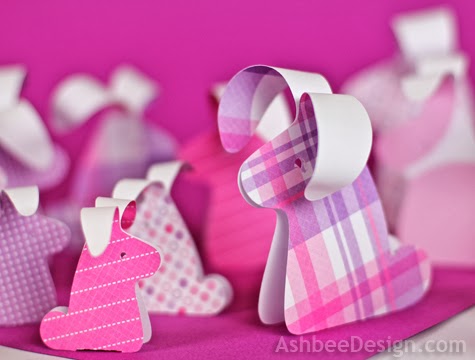
Last spring I designed a simple beginner pattern for a floppy-eared bunny to be cut on the Silhouette. I didn't become a contributing artist at Silhouette until June, well after Easter so I didn't make this file available until this week.


It is now available here and I have completed a tutorial here. It is a wonderful beginner project although the grass does require a good blade and mat.  And there are so many things you can do with it. I had such fun using wonderful spring papers and making bunny crowds!


Last Easter I paired them with birch logs and tulips plus my ombre Easter eggs to create this center piece.


If you've been waiting for this file, today is the day to go and get it - and make it!

**********
© 2014 Marji Roy, Ashbee Design

Sharing this post at some of these link parties. They are worth checking out for other ideas.


Friday, December 27, 2013

DIY Christmas Card • 2013

I again continued my tradition of hand-crafting my annual Christmas Card. The design for 2013 shows my increasing exploration of the possibilities with a Silhouette cutting machine, combined with my most frequent subject matter - the Christmas Tree. Save this as an idea for 2014.


I used a classic accordion card construction and combined it with a bezier curve tree I sketched in the software. It is cut from two pieces of card stock, that when glued together, create a 3-D self-standing card.

I also used a contemporary font to cut the message and the year into one layer of the card stock.

I mailed it in an evergreen envelope with a shorty Christmas letter on a red insert. I did mail all 70 of them on Monday, Dec. 16th but have learned that many on my list hadn't received theirs by the 25th. US Postal fail!


**********
© 2013 Marji Roy, Ashbee Design

Sharing this post at some of these link parties. They are worth checking out for other ideas.

Thursday, December 26, 2013

Contemporary Holiday Tree

Each year I, like very other blogger, decorate my front door area for the holiday. And I too get over-whelmed with holiday prep. Understand that is not a complaint. To me Christmas is very much a season, a season of prepping, sharing, giving, loving, remembering. I recently read that one way to reduce the stress of the holidays is to view it as a season and not just a day.  So true. So because this is a season, several of my holiday posts will be appearing after Christmas Day. I realize I won't inspire you this year, but possibly, you'll find it next year and I'll inspire you then.  So, here is your first idea for Christmas 2014!


I have a wonderful front portico. It has entries to both the sunroom and the family room but it is on the north side of the house and has a dark corner. For many years I have made evergreen arrangements for that corner but they get lost in the dark. This year I started thinking white stars, lots of them!

I then built 3 tree forms from saplings on which to display them. These saplings were cut from our property along the roadside where they need to be removed before they impact the power lines above. (That statement is to prevent the comments about how un-green it is of me to cut a live sapling. Many need to be cut!). I choose thin wispy ones about 10-12 feet high. The base became the tree base and then I cut cross pieces, each slightly smaller and thinner from the rest of the tree.

I snapped a few iPhone photos as I built the trees -


I pre-drilled a hole through each and then used drywall screws to attach them to the upright.

I made three tree bases in three different sizes. 

I connected the bases of all three with brown dowels at 2 levels to hold them in a triangular position and to be a self-standing trio of trees.

I also stacked some polystyrene and cut out about 75 stars in 4 different sizes with holes drilled in the top of each.


I added a red ribbon and positioned 1 star on each branch of each stick tree. A dab of hot glue holds them in place.


And then placed them in my portico to welcome family and friends to our home this holiday season.


Here is that same corner last year with the Christmas ladder. The ladder was much easier to make but because I had used it for 12 months I needed to try something new.


And here is the 2011 version.....


**********
© 2013 Marji Roy, Ashbee Design

Sharing this post at some of these link parties. They are worth checking out for other ideas.